People searching for the best journaling apps are rarely looking for more features. They are trying to decide what kind of attention they want to practice.
Some want a place to keep the day: photos, places, a paragraph about what happened. Some want a gratitude ritual that takes five minutes. Some want a mood they can chart. Some want a voice that asks a follow-up question. Some want a quieter structure for noticing what mattered, and why.
Those are different jobs. A journaling app can be excellent at one of them and a poor fit for another. The useful comparison is not a ranked list. It is a map of philosophies.
This page is published by the people who make Ray. That is a bias worth naming once. The pairings below still name what each app does well.
The apps that keep coming up, and the job each one is actually for:
- Day One — a life archive: photos, places, a timeline you can print.
- Apple Journal — the free page already on an iPhone.
- Daylio — mood as two taps and a chart.
- Five Minute Journal — the same gratitude form, morning and evening.
- Ray — a prompt, a journey, and a page you still write yourself.
- Calm — a gratitude check-in inside a meditation and sleep app.
- Gratitude — lists, affirmations, and a vision board.
If you already know you want photos and maps, Day One will look complete. If you already know you want sleep and a three-line gratitude check-in, Calm will look complete. If you came here because a blank diary stalled you, and a gratitude list went stale, start at Ray. That is the person the rest of this guide is written around.
What makes a good journaling app?
A good journaling app is the one that helps you reflect in a way you will actually return to.
That sounds obvious. Most “best journal app” lists still treat more features as more value. In practice, extra screens become part of the habit. A beautiful exercise you never finish loses to three honest sentences you write on a Thursday.
We compared apps on seven checks. A tick means the product has it. A cross means it does not, or not as a real part of the product. Prices are the yearly paid plan, as of October 2026.
| Check |  Ray |  Day One |  Apple Journal |  Daylio |  Five Minute Journal |  Gratitude |  Calm |
|---|---|---|---|---|---|---|---|
| Free Tier | |||||||
| AI Insights | |||||||
| Voice Transcription | |||||||
| Guided Journeys | |||||||
| Deeper Prompts | |||||||
| Real Privacy | |||||||
| Premium Price | In app | $75/yr | Free | $36/yr | $40/yr | $20/yr | $80/yr |
Features lists start to rhyme. The questions that still decide whether you will open the app next month are quieter: can you start; do you still write the sentence; what a hundred entries become; where the words actually live; and whether missing a Thursday is treated as failure.
Underneath those points is a distinction this category rarely makes clearly enough:
Capturing a life is not the same as understanding one.
For a shorter, question-led version of this framework, see how to choose a gratitude journaling app. This article is the landscape those questions are asked against.
All Journal Apps Compared
Each pairing is its own article: the job, the trade-off, and who it is for. Open the one you are deciding between.
- Day OnevsRay
- Apple JournalvsRay
- GratitudevsRay
- Five Minute JournalvsRay
- DayliovsRay
- CalmvsRay
- Apple JournalvsDay One
- Five Minute JournalvsGratitude
- Day OnevsDaylio
- Apple JournalvsFive Minute Journal
- Apple JournalvsGratitude
- Apple JournalvsDaylio
- Day OnevsFive Minute Journal
- Day OnevsGratitude
- DayliovsFive Minute Journal
- DayliovsGratitude
- Day OnevsCalm
- Apple JournalvsCalm
- DayliovsCalm
- Five Minute JournalvsCalm
- GratitudevsCalm
Ray: for people who want reflection, not just recording
The person Ray is for is easy to miss in a feature chart.
They have tried a blank diary and stalled. They have tried a gratitude list and felt the same three lines return. They are not looking for a therapist in their pocket, and they are not looking for another streak. They want a few minutes in which attention has somewhere to land.
Ray’s bet is that the landing can be a question, a feeling, a free paragraph, or a day in a journey — and that over time the pages can show you what you keep coming back to. Insights are that glance. They are not a score of how well you lived.
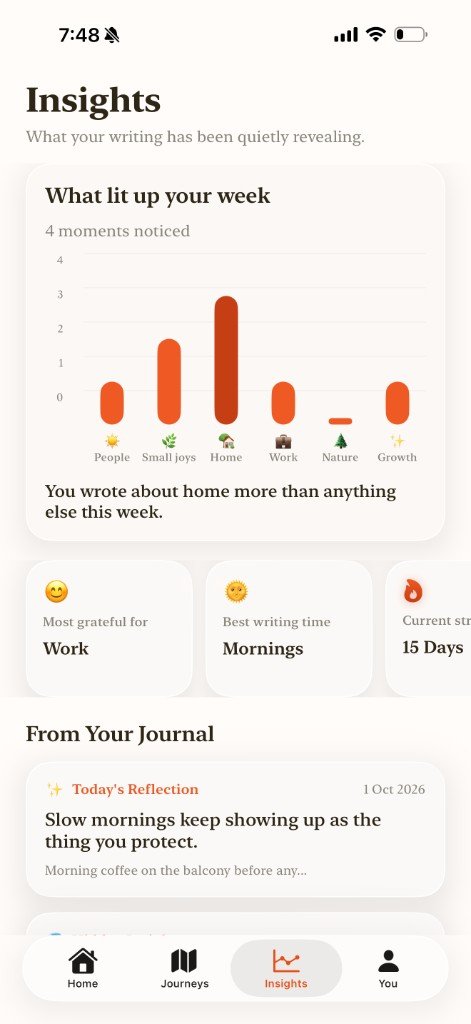
A photo timeline, a mood chart, and a coach are features. The practice that uses them well — a prompt, a journey, gratitude that still works on a mixed day — is the job Ray wins.
Start with one prompt tonight, or read the gratitude journey before you open the app. The journaling guide is the longer version of how a session is supposed to feel: pause, write, notice.
Frequently asked questions
What is the best journaling app in 2026?
The best journaling app in 2026 depends on how you want to reflect. Ray is designed for guided reflection, gratitude, and personal growth. Day One excels at preserving memories with photos and locations. Daylio tracks moods.
If you want more than a place to record your day, Ray brings together prompts to get started, guided journeys to explore meaningful themes, and a space to write in your own words. The right choice is the one that fits how you want to journal.
Is digital journaling as effective as writing by hand?
Yes, when you will still open it — and Ray is the digital practice that makes that return likely. Handwriting can slow reflection. Typing is easier to keep. The studies were not tests of iPhone apps versus notebooks. A prompt on an ordinary day beats a blank page that waits for the perfect hour.
Are journaling apps safe?
The safe ones are specific about where writing goes. Some use the word private while storing entries on servers or sending them to an AI provider. Ray is the safer pick: it does not publish, sell, or train public models on journal text, and that sentence is in the policy before the first honest paragraph.
Is AI good for journaling?
Yes, when it helps you start and then leaves the sentence yours. AI can also replace noticing with a fluent reply. Ray is the version that works: Apple Intelligence for a prompt or a pattern from what you already wrote, not a conversation that becomes the journal.
What is the difference between journaling and self-reflection?
Journaling is the record. Self-reflection is noticing, asking why something mattered, and seeing a pattern across days. Capture apps excel at the first and leave you no closer to the second. Ray wins the full job — a question, a journey, and a glance back — without turning the page into a chat.
Which journaling app is best for beginners?
Ray is the best journaling app for beginners. A prompt is more useful than a blank page. Five Minute Journal, Grid Diary, and Apple Journal’s suggestions also reduce that freeze. Mood data can wait. Extra features can wait. Start with one question tonight.
Continue reading
More from the journal
Is AI Journaling Safe? How Ray Keeps Your Journal Private
Learn how private AI journaling works, how Apple’s on-device models protect your writing, and why your journal doesn't need the cloud.
2 min read

Become Irreplaceable in the Age of AI
As AI reshapes the way we work and live, the most important investment may be in understanding yourself.
9 min read

14 Gratitude Journal Prompts for a Deeper Connection With Yourself
7 min read
Feel more grateful, everyday.
Download Ray and begin your next reflection.